
Download AInterior Design – AI‑powered interior redesign tool, free & secure
Overview
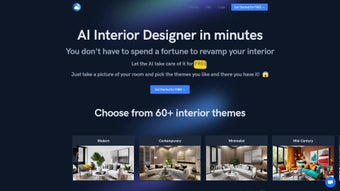
AInterior Design is an innovative, AI‑driven web application that lets anyone transform a room’s look in seconds. By simply uploading a photo of your space, the platform generates realistic visualizations across more than 60 distinct interior design styles—ranging from sleek modern minimalism to timeless classic elegance and bold eclectic mixes. The technology behind AInterior Design combines deep‑learning image analysis with style‑matching algorithms, producing a quick, cost‑effective alternative to traditional interior‑design consultations.
Users receive a high‑resolution mock‑up that can be downloaded, shared, or further tweaked within the app’s built‑in editor. While the generated designs are impressively accurate, a few minor adjustments—such as swapping a rug or changing a wall color—may be needed to perfectly align with personal taste. The user‑friendly interface, real‑time rendering, and instant feedback make the tool ideal for homeowners, renters, real‑estate agents, and even DIY enthusiasts who want to visualise a makeover before committing to purchases or renovations.
Beyond the core functionality, AInterior Design places a strong emphasis on privacy and data security. All images are transmitted over HTTPS, processed on encrypted cloud servers, and automatically deleted after the session ends, complying with GDPR and other major data‑privacy regulations. The platform also offers a collaborative sharing feature, allowing users to generate a unique shareable link that stakeholders—such as contractors, interior decorators, or family members—can view without needing an account.
This collaborative angle speeds up decision‑making and reduces the back‑and‑forth that typically slows down renovation projects. In terms of accessibility, the service is completely browser‑based, meaning there is no need to download or install heavyweight software. Whether you are on a Windows PC, a macOS laptop, an Android tablet, or an iPhone, AInterior Design adapts to your screen size and delivers consistent performance.
The combination of speed, security, cross‑platform reach, and a generous free tier positions AInterior Design as a leading choice for anyone looking to experiment with interior concepts without breaking the bank.
Key Features & Benefits
- AI‑powered style engine: Automatically analyses room dimensions, lighting, and existing furniture to suggest coherent design schemes.
- 60+ design styles: Includes Modern, Scandinavian, Industrial, Classic, Boho, Mid‑Century, Minimalist, Coastal, Rustic, Eclectic and many niche themes.
- Instant rendering: Generates a realistic 3D visualization in under 30 seconds, allowing rapid iteration.
- High‑resolution export: Download images in 4K quality for presentations, mood boards, or social sharing.
- Editable element library: Swap furniture, wall colors, flooring, and accessories directly within the browser without re‑uploading the photo.
- Cost‑effective alternative: Saves thousands of dollars compared to hiring a professional interior designer.
- Cross‑platform accessibility: Works on any modern browser, no software installation required.
- Secure cloud processing: Images are processed over encrypted connections and deleted after the session, protecting user privacy.
- Guided design insights: The app provides a brief style report, suggesting paint colors, lighting options, and furniture sources.
- Free tier & premium upgrades: Core functionality is free; premium plans unlock unlimited renders, higher resolution exports, and priority AI processing.
Beyond the headline features, AInterior Design shines in its ability to democratise interior design. Users without any design background can experiment with colour palettes, furniture layouts, and decorative accents, gaining confidence before committing to a physical makeover. The AI model continuously learns from user feedback, meaning the suggestions improve over time, becoming more attuned to regional trends and personal preferences.
Moreover, the platform’s collaborative sharing tools let you invite friends, family, or contractors to review the mock‑ups, fostering a smoother decision‑making process. For real‑estate agents, the app serves as a virtual staging tool, allowing potential buyers to envision a furnished home, which can accelerate sales cycles. The built‑in style report also acts as an educational guide, explaining why certain colour combinations work together and how lighting can affect perception of space.
This educational angle helps users develop a basic design vocabulary, empowering them to make more informed choices even outside the app. Additionally, the premium tier includes priority AI processing, which reduces render times during peak usage periods—a crucial benefit for professionals handling multiple client projects simultaneously. Overall, the blend of speed, variety, and accessibility makes AInterior Design a compelling addition to any design‑oriented workflow, whether you’re a casual homeowner or a seasoned interior consultant.
Installation, Usage & Compatibility
Getting Started – No Download Required
Since AInterior Design is a web‑based solution, there is no traditional installation process. Users simply navigate to the official website, create a free account, and begin uploading images. The registration process takes less than a minute—just an email address and a password. After confirming the email, you’ll be directed to the dashboard where the “Create New Design” button launches the AI engine. A quick tutorial video appears on first login, walking new users through the upload, style selection, and export steps, ensuring even the most tech‑averse can start designing immediately.
Step‑by‑Step Workflow
- Upload a photo: Choose a high‑resolution image of the room you wish to redesign. The AI works best with natural lighting and clear views of walls and floor.
- Select a style: Browse the style gallery or use the search bar to find a specific aesthetic. You can apply multiple styles sequentially to compare results.
- Generate the mock‑up: Click “Render” and wait for the AI to process the image. Within 20‑30 seconds, a side‑by‑side comparison appears, showing the original and the redesigned version.
- Fine‑tune elements: Use the on‑screen toolbar to adjust furniture placement, change wall colours, or replace décor items. Each adjustment updates the preview in real time.
- Export or share: When satisfied, click “Download” to save the high‑resolution image or “Share” to generate a shareable link for collaborators.
Compatibility
AInterior Design runs on any device with a modern web browser that supports WebGL and HTML5. Tested browsers include Chrome (latest), Firefox, Safari, Edge, and Opera. Because the heavy lifting is performed on secure cloud servers, the client device only needs enough RAM (2 GB minimum) and a stable internet connection (at least 5 Mbps for smooth rendering).
The platform is fully responsive, meaning it works equally well on desktop monitors, laptops, tablets, and smartphones (iOS and Android). While the experience is most fluid on larger screens, the mobile version retains all core features, allowing on‑the‑go redesigns. For power users, a browser extension is available for Chrome and Edge that adds a “Capture & Redesign” button directly on image‑heavy webpages (e.g., Pinterest, Instagram).
This shortcut sends the image to AInterior Design without leaving the current tab, further streamlining the workflow. The extension also includes a quick‑save option that stores the original image locally before uploading, ensuring you always have a backup copy.
Pros & Cons, FAQ & Conclusion
Advantages
- Instant, high‑quality visualisations save time and money.
- Large library of design styles caters to diverse tastes.
- Free tier provides generous functionality for casual users.
- No software download; works on any OS with a browser.
- Secure, encrypted processing protects user privacy.
- Editable elements let you customise beyond the AI suggestion.
- Collaboration tools simplify sharing with stakeholders.
- Continuous AI improvements through user feedback loops.
- Educational style reports help users learn basic design principles.
- Browser extension speeds up workflow for frequent designers.
Limitations
- Minor manual adjustments may be required for perfect realism.
- High‑resolution exports are limited to premium accounts.
- Complex rooms with heavy clutter can confuse the AI detection.
- Internet connection is mandatory; offline usage not supported.
- Advanced architectural changes (e.g., moving walls) are not possible.
- Render speed may vary during peak server load for free users.
Frequently Asked Questions
Is AInterior Design really free to use?
Yes, the core functionality—including uploading photos, selecting styles, and generating up to three renders per month—is completely free. Premium plans are optional and provide unlimited renders, higher‑resolution downloads, and priority AI processing.
Can I use the tool on my smartphone?
Absolutely. AInterior Design is responsive and works on iOS and Android browsers that support WebGL. The mobile experience retains all major features, allowing you to redesign rooms while on the go.
How secure is my uploaded photo?
Your images are transmitted over HTTPS, processed on encrypted cloud servers, and automatically deleted after the session ends. The platform complies with GDPR and other major data‑privacy regulations.
Do I need any design experience to get good results?
No design background is required. The AI suggests complete style schemes, and the intuitive editor lets you tweak details if you wish. The generated mock‑ups are ready to share with contractors or friends for feedback.
Can I export the design for use in other 3D software?
AInterior Design provides high‑resolution PNG/JPEG exports. For advanced workflows, premium users can request a .obj file (available on request) that can be imported into most 3D modelling packages.
Overall, AInterior Design stands out as a powerful, user‑friendly tool that brings professional‑grade interior visualisation to anyone with an internet connection. Its AI engine, extensive style library, and real‑time editing capabilities make it a go‑to solution for homeowners, renters, real‑estate professionals, and design enthusiasts alike. While premium features unlock the highest‑resolution exports and unlimited renders, the free tier already delivers enough value to experiment with multiple looks without any financial commitment. If you’re looking to eliminate guesswork, reduce renovation costs, and confidently present design ideas, AInterior Design offers a fast, secure, and cost‑effective pathway to a beautifully reimagined space.
Ready to visualise your dream space? Visit the AInterior Design website today, create your free account, and start redesigning in seconds. Transforming a room has never been this quick, affordable, or fun.
AInterior Design delivers a powerful AI‑driven redesign experience that feels both professional and accessible. The free tier is generous, the UI is clean, and the rendered images are impressively realistic. Minor manual tweaks are occasionally needed, but the overall value far outweighs the limitations. Ideal for anyone wanting to explore interior concepts without a hefty designer fee.



.png)



